Note
Go to the end to download the full example code or to run this example in your browser via Binder.
Introduction to pyAML#
This tutorial is the starting point of the pyAML tutorials. It introduces what pyAML is, the main concepts you will meet in the other tutorials, and how the tutorials are organized. It does not contain any code: the hands-on part starts in the next tutorial.
What is pyAML?#
The Python Accelerator Middle Layer (pyAML) is a Python library, developed by a collaboration of accelerator facilities, that gives a common, physics-oriented way to access a particle accelerator. With pyAML you read “the orbit at all BPMs” or set “the strength of quadrupole QF_001” without having to know which control system variable holds the value, or how a power-supply current is converted into a magnetic strength.
Its main goals are to:
provide the same interface for the real machine, a virtual accelerator and a simulation model, independently of the control system (TANGO, EPICS, …),
allow measurement and correction tools (orbit, tune, chromaticity, …) to be written once and shared between facilities,
allow those tools to be developed and tested on a simulation, without using beam time.
You can read more about the motivation and goals in What is pyAML?.
Main Concepts#
Working with pyAML means working with a small hierarchy of objects:
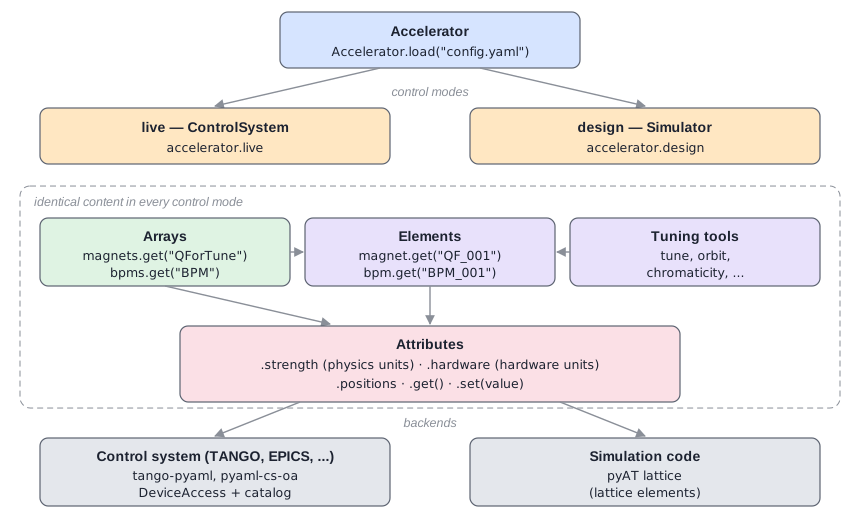
Accelerator: the top-level object describing one machine. It is created from a configuration.
Control mode: one way of accessing the accelerator. In the figure above
accelerator.livetalks to the a control system andaccelerator.designtalks to a simulation of the machine made with pyAT. Both provide exactly the same interface.Element: one object of the machine, such as a magnet, a BPM or a RF cavity.
Array: a named group of elements which can be read or set in one call, such as all the BPMs.
Attribute: a value of an element that can be read with
get()and written withset(), such as thestrengthof a magnet.Configuration: a structure (most commonly a YAML or JSON file) describing all of the above. Each item of the configuration names a Python class with its
classfield, and each other field is an argument of that class’s constructor. This rule is explored in the first tutorial.
See pyAML Structure and Control Modes for more details, and the Glossary for the definitions of the terms used in pyAML.
How the Tutorials Work#
Running the tutorials. Each tutorial can be run in the cloud without requiring to install or download anything by using the Binder launcher on the tutorial page or as a Jupyter notebook or a Python script on your own computer (see below for instructions).
The test machine. The tutorials use a small test storage ring, with its lattice and
ready-made pyAML configurations, provided by the pyaml-test-lattice package. It is
presented in the tutorials where it is first used.
The control mode. The tutorials use the design control mode, a simulation of the
machine, so no control system is needed. To run them on the live control mode, you need a
control system, for example a virtual accelerator of the test machine
(see Installing Apptainer).
Since all control modes have the same interface, switching is a single line:
SR = accelerator.design # replace by accelerator.live to use the control system
Run the Tutorials Locally#
You need Python 3.11 or newer. Always install in a virtual environment, to avoid breaking your Python installation (see New to Python if you are not familiar with virtual environments). Then do:
Install the requirements for the tutorials
pip install -r https://raw.githubusercontent.com/python-accelerator-middle-layer/documentation/main/binder/requirements.txt
[Optional] If you want to run as notebooks, install JupyterLab
pip install jupyterlab
Finally, download a tutorial as a notebook or a Python script using the download link in
the right sidebar of the tutorial’s page, and run it with jupyter lab or python.
You can also download all tutorials in one go on the Tutorials main page.
Where to Go Next#
There are two type of tutorials:
Functionality: These cover the functionality of pyAML.
Use cases: These apply pyAML to real tasks.
The tutorials are designed to first follow the functionality and then the use cases but they can also be run independently depending on your interests.
For more background, read the explanations:
