
Note
Go to the end to download the full example code or to run this example in your browser via Binder.
Create an Accelerator#
This tutorial shows the different ways to create a pyAML accelerator.
The example only uses the design control mode, which is a simulator of the machine based
on pyAT. See Introduction to pyAML for an
overview of the control modes and the other concepts used here.
The first approach constructs the objects interactively whereas the second one creates them by loading a configuration file. Both produce the same final interface, but each is suited to different use cases which will be explained in the tutorial. You will also see that the two approaches are closely related: each field of the configuration file is an argument of the constructor of a Python class.
Prerequisites#
This tutorial requires a lattice file in a format supported by pyAT.
The example uses the lattice provided by the pyaml-test-lattice package.
The Test Lattice#
The test lattice, fodo_1gev_6d, is a small 1 GeV electron storage ring made of
16 identical FODO cells of 4.8 m, for a circumference of 76.8 m. Each cell contains a
focusing quadrupole QF and sextupole SF, a beam position monitor BPM, a corrector
COR acting in both planes, a dipole B, a defocusing quadrupole QD and sextupole
SD, and a second dipole B:
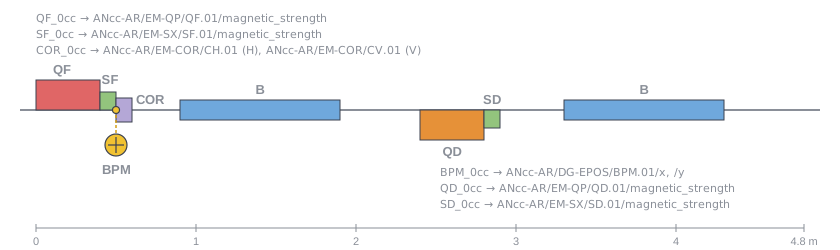
One cell of the test lattice with the control-system name of each element
(cc is the cell number, from 01 to 16).#
Each element is named after its family and a three-digit index equal to the cell number:
QF_001 is the focusing quadrupole of the first cell. This is the magnet used in
this tutorial.
# Get the path to the lattice file
from pyaml_test_lattice import lattices

# List available files and their descriptions
print(lattices)

lattice_file = lattices['fodo_1gev_6d.json']
{
'fodo_1gev_6d.json': FODO lattice for the 1 GeV, 6D test case.
}
Approach 1: Interactive Creation#
In the first approach the different parts of the accelerator is created interactively. In this example we will only create a single quadrupole magnet to use with the simulator mode.
Create a Quadrupole Magnet#
from pyaml.magnet.identity_model import IdentityMagnetModel
from pyaml.magnet.quadrupole import Quadrupole
from pyaml.lattice.simulator import Simulator

# Create a model for the magnet
model = IdentityMagnetModel(physics='')

# Create the quadrupole
quad = Quadrupole(name="QF_001", model=model)

# Create the simulator
simulator = Simulator(name="design", lattice=lattice_file)

# Attach the quadrupole to the simulator
simulator.fill_device([quad])
quad = simulator.magnet.get("QF_001")
Read and Set the Quadrupole Strength#
print(f"Initial strength: {quad.strength.get()}")

quad.strength.set(0.504)

print(f"Updated strength: {quad.strength.get()}")
Initial strength: 0.5032201257634845
Updated strength: 0.504
Create an Accelerator#
You can also create an accelerator.
This is not strictly necessary for this simple example with only a single device. However, it provides an interface for adding metadata, supporting multiple control modes, and grouping devices.
The features of the accelerator is explored in other tutorials.
from pyaml.accelerator import Accelerator

# Recreate the simulator since the accelerator will handle the attachment
simulator = Simulator(name="design", lattice=lattice_file)

accelerator = Accelerator(
    facility="pyAML_test_facility",
    machine="pyaml_test_machine",
    energy=1e9,
    simulators=[simulator],
    devices=[quad]
)

# Get the quadrupole
quad = accelerator.design.magnet.get("QF_001")

# Read the strength in the same way as before
quad.strength.get()
np.float64(0.5032201257634845)
Approach 2: Load a Configuration#
Devices can also be created by loading a configuration file.
Configuration files are loaded through the interface of the accelerator and are intended to be used for use cases with many devices, several control modes etc.
Configuration files can be written in YAML or JSON. This example shows a YAML file.
The Configuration Rule
A configuration file describes the same objects as the ones created in approach 1, following one simple rule:
The
classfield gives the full path of the Python class to create,Every other field is an argument of the constructor of that class with the same name as the field and the value to pass to the constructor,
When an argument is itself an object, its value is a nested item with its own
classfield.
In approach 1 the quadrupole was created with:
Quadrupole(name="QF_001", model=IdentityMagnetModel(physics=""))
When writing a configuration file instead it becomes:
class: pyaml.magnet.quadrupole.Quadrupole
name: QF_001
model:
  class: pyaml.magnet.identity_model.IdentityMagnetModel
  physics: ''
Since the accepted fields of a class are given by the arguments of its constructor, you
can see them using help(). The first lines show the constructor signature, and the
Parameters section describes each argument:
help(Quadrupole)
Help on class Quadrupole in module pyaml.magnet.quadrupole:

class Quadrupole(pyaml.magnet.magnet.Magnet, pyaml.validation.validation_models.DynamicValidation)
 |  Quadrupole(name: str, model: pyaml.magnet.model.MagnetModel | None = None, lattice_names: str | None = None, description: str | None = None)
 |
 |  Normal quadrupole magnet element.
 |
 |  The strength is applied to the ``PolynomB[1]`` component of the underlying lattice element, the
 |  field component used for focusing or defocusing the beam. Strengths are expressed in ``m-1`` and
 |  converted to power-converter values by the attached magnet model.
 |
 |  Parameters
 |  ----------
 |  name : str
 |      Element name.
 |  model : MagnetModel | None, optional
 |      Magnet model used to convert between strength and hardware value, and to
 |      resolve the underlying control-system device names.
 |  lattice_names : str | None, optional
 |      Name or names of the matching element(s) in the simulated lattice. Defaults
 |      to ``name``.
 |  description : str | None, optional
 |      Human-readable description of the magnet.
 |
 |  See Also
 |  --------
 |  Magnet : Base class listing the strength and hardware accessors.
 |
 |  Method resolution order:
 |      Quadrupole
 |      pyaml.magnet.magnet.Magnet
 |      pyaml.common.element.Element
 |      pyaml.validation.validation_models.DynamicValidation
 |      builtins.object
 |
 |  Methods defined here:
 |
 |  __init__(self, name: str, model: pyaml.magnet.model.MagnetModel | None = None, lattice_names: str | None = None, description: str | None = None)
 |      Initialize the Quadrupole.
 |
 |  ----------------------------------------------------------------------
 |  Data and other attributes defined here:
 |
 |  __abstractmethods__ = frozenset()
 |
 |  __annotations__ = {}
 |
 |  __slotnames__ = []
 |
 |  polynom = <pyaml.lattice.polynom_info.PolynomInfo object>
 |
 |  ----------------------------------------------------------------------
 |  Methods inherited from pyaml.magnet.magnet.Magnet:
 |
 |  __repr__(self)
 |      Implement the ``__repr__`` string.
 |
 |  attach(self, peer, strength: pyaml.common.abstract.ReadWriteFloatScalar, hardware: pyaml.common.abstract.ReadWriteFloatScalar) -> Self
 |      Return a copy of this magnet bound to a control system or simulator.
 |
 |      Parameters
 |      ----------
 |      peer : ElementHolder
 |          Control system or simulator the copy is bound to.
 |      strength : abstract.ReadWriteFloatScalar
 |          Accessor for the physical strength on that peer.
 |      hardware : abstract.ReadWriteFloatScalar
 |          Accessor for the hardware value on that peer.
 |
 |      Returns
 |      -------
 |      Self
 |          Copy of this magnet bound to ``peer``.
 |
 |  get_model_name(self) -> str
 |      Returns the model name of this magnet
 |
 |  set_energy(self, energy: float)
 |      Set the energy in eV to compute and set the magnet rigidity
 |      on the underlying magnet model.
 |
 |  set_model_name(self, name: str)
 |      Sets the name of this magnet in the model
 |      (Used for combined function magnet)
 |
 |  ----------------------------------------------------------------------
 |  Readonly properties inherited from pyaml.magnet.magnet.Magnet:
 |
 |  hardware
 |      Gives access to the strength of this magnet in
 |      hardware unit when possible
 |
 |  model
 |      Returns a handle to the underlying magnet model
 |
 |  model_name
 |      Name used to identify this magnet in its model.
 |
 |  strength
 |      Gives access to the strength of this magnet in physics unit
 |
 |  ----------------------------------------------------------------------
 |  Methods inherited from pyaml.common.element.Element:
 |
 |  attached_to(self) -> str
 |      Return a human-readable description of the attached peer.
 |
 |      Returns
 |      -------
 |      str
 |          Peer type and name, or ``"None"`` when unattached.
 |
 |  check_peer(self)
 |      Raise an error if the element is not attached to a peer.
 |
 |      Raises
 |      ------
 |      PyAMLException
 |          If the element is not attached to a simulator or control system.
 |
 |  get_description(self) -> str | None
 |      Return the element description, if available.
 |
 |  get_lattice_names(self) -> str | None
 |      Return the lattice selector associated with the element.
 |
 |  get_name(self) -> str
 |      Return the element name.
 |
 |  post_init(self)
 |      Perform post-construction initialization after attachment.
 |
 |      Base elements do not require additional initialization.
 |
 |  set_harmonic(self, h: int)
 |      Set the RF harmonic number, if supported.
 |
 |      Parameters
 |      ----------
 |      h : int
 |          Number of RF buckets per revolution.
 |
 |  set_mcf(self, alphac: float)
 |      Set the momentum compaction factor, if supported.
 |
 |      Parameters
 |      ----------
 |      alphac : float
 |          Momentum compaction factor.
 |
 |  ----------------------------------------------------------------------
 |  Readonly properties inherited from pyaml.common.element.Element:
 |
 |  description
 |      Return the element description, if one is configured.
 |
 |  lattice_names
 |      Return the lattice selector associated with the element.
 |
 |  name
 |      Return the element name.
 |
 |  peer
 |      Return the simulator or control system attached to the element.
 |
 |  ----------------------------------------------------------------------
 |  Data descriptors inherited from pyaml.common.element.Element:
 |
 |  __dict__
 |      dictionary for instance variables
 |
 |  __weakref__
 |      list of weak references to the object
 |
 |  ----------------------------------------------------------------------
 |  Data and other attributes inherited from pyaml.common.element.Element:
 |
 |  __pyaml_repr_exclude__ = ('description',)
 |
 |  ----------------------------------------------------------------------
 |  Class methods inherited from pyaml.validation.validation_models.DynamicValidation:
 |
 |  __init_subclass__(**kwargs)
 |      Generate and attach a validation model for the subclass.
 |
 |      Parameters
 |      ----------
 |      **kwargs : Any
 |          Additional keyword arguments passed to ``super().__init_subclass__``.
 |
 |      Raises
 |      ------
 |      TypeError
 |          If ``validation_model`` is defined manually on the subclass.
 |
 |  ----------------------------------------------------------------------
 |  Data and other attributes inherited from pyaml.validation.validation_models.DynamicValidation:
 |
 |  validation_model = <class 'pyaml.validation.validation_models.Quadrupo...
Write the Configuration File#
You can write a configuration file with any text editor. More details, advice and tools that can help are described in the how-to guide Create and Load Configuration.
The file below describes the same accelerator as in approach 1. The main difference is
that the lattice path is given by an environment variable, using the ${env:NAME} syntax.
It could also be written directly as an absolute path, or relative to a root directory.
configuration = """\
class: pyaml.accelerator.Accelerator
facility: pyAML test facility
machine: pyaml test machine
energy: 1.0e9
simulators:
  - class: pyaml.lattice.simulator.Simulator
    name: design
    lattice: ${env:PYAML_TEST_LATTICE}
devices:
  - class: pyaml.magnet.quadrupole.Quadrupole
    name: QF_001
    model:
      class: pyaml.magnet.identity_model.IdentityMagnetModel
      physics: ''
"""

with open("config.yaml", "w", encoding="utf-8") as file:
    file.write(configuration)
Specify the Path#
The path to the configuration file can be specified as absolute or relative to a root directory.
# Set the root directory
from pathlib import Path
from pyaml.configuration import ROOT

current_dir = Path.cwd()
ROOT.set(current_dir)

# Display the content of the file
config_path = Path('config.yaml')
print(config_path.read_text())
class: pyaml.accelerator.Accelerator
facility: pyAML test facility
machine: pyaml test machine
energy: 1.0e9
simulators:
  - class: pyaml.lattice.simulator.Simulator
    name: design
    lattice: ${env:PYAML_TEST_LATTICE}
devices:
  - class: pyaml.magnet.quadrupole.Quadrupole
    name: QF_001
    model:
      class: pyaml.magnet.identity_model.IdentityMagnetModel
      physics: ''
Set the environment variable used in the configuration file for the lattice path.
import os
os.environ["PYAML_TEST_LATTICE"] = lattice_file
Create an Accelerator#
from pyaml.accelerator import Accelerator

accelerator = Accelerator.load('config.yaml')

# Get the quadrupole
quad = accelerator.design.magnet.get('QF_001')

# Use the quadrupole in the same way as before
quad.strength.get()
np.float64(0.5032201257634845)
Mistakes Are Detected#
Since each field must be a constructor argument, a misspelled or unknown field is
rejected when the configuration is loaded. Here phyiscs is written instead of physics:
wrong_configuration = configuration.replace("physics:", "phyiscs:")

with open("config.yaml", "w", encoding="utf-8") as file:
    file.write(wrong_configuration)

try:
    Accelerator.load("config.yaml")
except Exception as error:
    print(type(error).__name__)
    print(error)

# Restore the correct configuration file
with open("config.yaml", "w", encoding="utf-8") as file:
    file.write(configuration)
PyAMLConfigException
got an unexpected keyword argument 'phyiscs' when creating 'pyaml.magnet.identity_model.IdentityMagnetModel'
