
pyAML Structure#
This page explains how pyAML is organized: which packages it is made of and how the objects you work with are related to each other.
Packages#
pyAML is not a single package but a small ecosystem. You only install what your facility needs.
Package |
Role |
|---|---|
|
The core: accelerator, elements, arrays, unit conversion, configuration loading and validation, tuning tools, the simulator backend based on pyAT, and the abstract interface ( |
|
Control-system bindings for TANGO. |
|
Control-system bindings based on ophyd-async, supporting EPICS (Channel Access and PV Access) and TANGO. |
Facility packages |
Optional packages containing classes specific to one facility (special magnet models, devices, applications, …). |
|
A test lattice with ready-made configurations, used in the tutorials and for integration tests. |
The core never imports a control system library directly. A control system is selected in the configuration by naming the class of its bindings, which implement the abstract interface of the core. Only the bindings you use have to be installed. See User Installation and the API Reference.
Object Hierarchy#
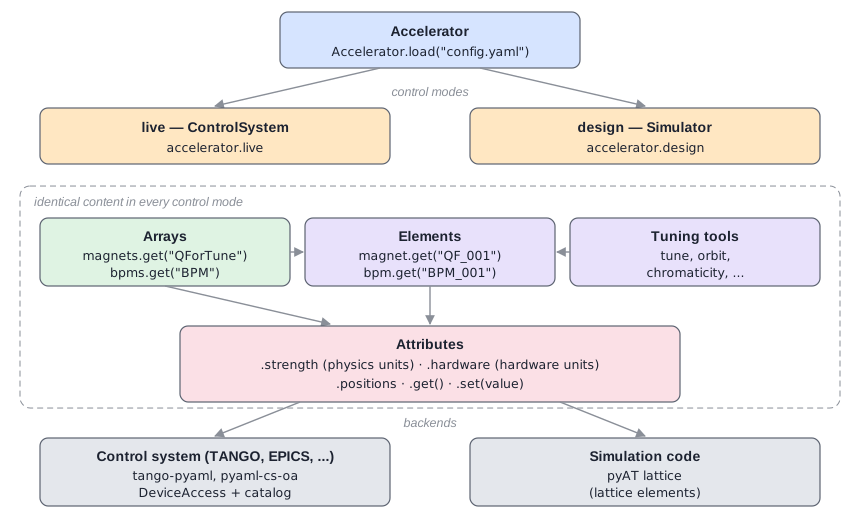
The pyAML object hierarchy. Every control mode contains the same arrays, elements and tools, connected to a different backend.#
Accelerator#
The Accelerator is the entry point. It represents one machine (for example a storage ring) and is usually created by loading a configuration file:
from pyaml.accelerator import Accelerator

accelerator = Accelerator.load("config.yaml")
It holds general information such as the facility name, the machine name and the energy, together with the control modes, arrays and devices.
Control Modes#
A control mode is one way to access the machine. Two kinds are implemented:
A
ControlSystemreads and writes values through a control system. It is typically namedliveand gives access to the real machine or to a virtual accelerator.A
Simulatorreads and writes values in a pyAT lattice model. It is typically nameddesign.
Each control mode is available as an attribute of the accelerator, named after the mode:
live = accelerator.live
design = accelerator.design
All control modes provide exactly the same interface, so code written for one mode works in any other. See Control Modes for details.
Elements#
Elements are the individual objects of the machine: magnets (Quadrupole, Sextupole, HCorrector, combined-function magnets, …), BPM, RFPlant, BetatronTuneMonitor, etc. They are declared once in the devices section of the configuration.
When the accelerator is created, each element is attached to every control mode. Each mode receives its own copy, connected to its own backend. This is why the same magnet can be reached from any mode:
qf_live = accelerator.live.magnet.get("QF_001")      # connected to the control system
qf_design = accelerator.design.magnet.get("QF_001")  # connected to the pyAT lattice
Attributes#
Elements expose attributes that can be read and written with get() and set(). For example a magnet has:
strength: the value in physics units (for example1/mfor a quadrupole),hardware: the value in hardware units (for exampleAfor a power-supply current).
The conversion between the two is done by the magnet model given in the configuration (for example IdentityMagnetModel or LinearMagnetModel). A BPM provides positions, offset and tilt.
Using explicit get() and set() methods instead of plain assignment is a deliberate choice: quad.strenght.set(0.5) (note the typo) raises an error, whereas an assignment quad.strenght = 0.5 would silently create a new Python attribute and leave the magnet unchanged.
Arrays#
Arrays are named groups of elements, declared in the arrays section of the configuration. They allow reading or setting all elements of a group in a single call. When the backend supports it, the individual requests are grouped (for example pyaml-cs-oa sends them concurrently, and the simulator computes the closed orbit once for all the BPMs of an array):
quads = accelerator.design.magnets.get("QForTune")
k = quads.strengths.get()     # numpy array, one value per magnet
quads.strengths.set(k * 1.001)

orbit = accelerator.design.bpms.get("BPM").positions.get()
Arrays are also how high-level tools know which elements to use: a tune correction tool, for example, is configured with the name of the quadrupole array it should act on.
Tuning Tools#
Measurement and correction tools (tune, chromaticity, orbit, dispersion, response matrices, …) are configured in the devices section like elements, and attached to every control mode in the same way. They refer to arrays and diagnostics by name. As a result, a tool configured once can be run on the simulator and on the real machine without any change.
Backends and Device Access#
At the bottom of the hierarchy, attributes talk to a backend:
In a
ControlSystem, each attribute uses aDeviceAccessobject, which represents one control-system signal (a TANGO attribute, an EPICS PV, …). The control-system bindings create these objects from the keys written in the configuration, with the help of a catalog.In a
Simulator, attributes read and write the corresponding elements of the pyAT lattice. The link is made by name (lattice_names, defaulting to the element name) or by a linker matching an attribute of the lattice elements.
Discovering What Is Available#
The accelerator provides a yellow_pages object listing everything that is configured: control modes, arrays, tools and diagnostics. Its availability() method tells in which control modes a given entry is available:
print(accelerator.yellow_pages)
Where the Configuration Fits#
Every object described on this page is constructed from the configuration. Each configuration item names a class and gives the arguments of its constructor. The configuration therefore mirrors this hierarchy directly: an Accelerator with controls, simulators, arrays and devices. See Configuration Structure and Syntax.