
Use JSON Schema in VS Code#
VS Code can use a JSON Schema to help writing and editing JSON and YAML files. The schema provides completion, property descriptions, and diagnostics for invalid values.
This guide shows how to associate a JSON Schema with JSON and YAML files and use it to write pyAML configuration files.
Required Extensions#
JSON: JSON support is built into VS Code. JSON files are recognized automatically when their names end in
.json.YAML: For YAML you need to install an extension. Open the
Extensionsview, search forYAMLand install the extension published by Red Hat.
Enable Remote Schema Downloads#
To be able to use schemas that are hosted online (for example on GitHub), VS Code must be allowed to download the schema. Open File -> Preferences -> Settings and search for JSON: Schema Download: Enable and enable it.
You also need to add the source to trusted domains. Search for JSON: Schema Download: Trusted Domains and add the domain you want to download from there. For GitHub that should be https://raw.githubusercontent.com/.
Add the JSON Schema#
You can associate a JSON Schema with a file in two ways, directly in the file or in the VS Code settings for a more permanent setup. The examples here show the option to do it directly in the file. See the VS Code Documentation for details how to do it in settings.
The examples use the accelerator schema published in pyaml-schemas but it is also possible to use a local file. Place this as the first sentence in the file:
JSON:
{
  "$schema": "https://raw.githubusercontent.com/python-accelerator-middle-layer/pyaml-schemas/main/schemas/accelerator.schema.json",
}
YAML:
# yaml-language-server: $schema=https://raw.githubusercontent.com/python-accelerator-middle-layer/pyaml-schemas/main/schemas/accelerator.schema.json
Edit the File#
VS Code should now provide code completion when you type a property name. Hover over a property to see its description and red or yellow squiggles should show when a value does not match the schema.
The way the completion looks and works is slightly different between JSON and YAML.
JSON:
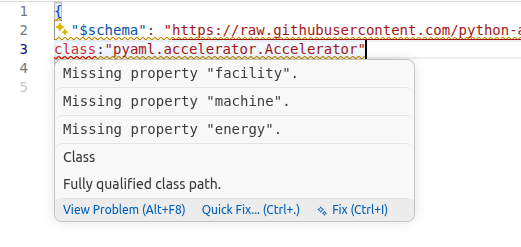
Hints for the JSON Schema in VS Code when writing JSON.#
YAML:

Hints for the JSON Schema in VS Code when writing YAML.#